
Programming is a problem-solving activity that involves designing, coding, testing, and maintaining software applications.
If you are a good problem solver, you have the potential to become a good programmer.
To effectively solve problems and create high-quality software, developers often follow a structured approach known as the software development method. This method provides a systematic way to plan, execute, and manage software projects.
The first step in the software development method is to clearly define what the problem is and what the desired outcome should be.
This involves gathering requirements from stakeholders, understanding the needs of users, and identifying any constraints or limitations that may affect the solution.
By specifying the problem requirements, developers can ensure that they are working towards a clear and well-defined goal, which helps to guide the subsequent steps in the development process.
The problem must be stated clearly and unambiguously.
You should eliminate unimportant aspects and focus on the root problem.
This requirement gathering from the one who posted the problem ensures that the solution addresses the core issue effectively.
Once the problem requirements are specified, the next step is to analyze the problem in depth.
This involves breaking down the problem into smaller, more manageable components, identifying any patterns or relationships, and understanding the underlying principles that govern the problem domain.
By analyzing the problem, developers can gain insights into the best approaches for solving it and can identify potential challenges or obstacles that may arise during the development process.
During the analysis phase, developers may also consider different algorithms or data structures that could be used to solve the problem, and they may evaluate the trade-offs between different approaches to determine the most efficient and effective solution.
Analyzing the problem involves identifying the following:
Underline phrases in the problem statements that identify the inputs and outputs.
Let's consider an example:
Problem Statement: Write a program that takes a list of numbers as input and outputs the average of those numbers.
In this problem statement, the input is a list of numbers, and the output is the average of those numbers.
Problem Statement: Write a program that takes a number and outputs whether the number is even or odd.
In this problem statement, the input is a number, and the output is whether the number is even or odd.
Problem Statement: Write a program that takes a cost per unit and a quantity as input and outputs the total cost.
In this problem statement, the inputs are the cost per unit and the quantity, and the output is the total cost.
Once you know the problem inputs and outputs, develop a list of formulas that specify relationships between them.
For example, for the average problem: average = sum_of_numbers / count_of_numbers
For the even/odd problem: if number % 2 == 0, then it's even; otherwise, it's odd.
For the total cost problem: total_cost = cost_per_unit * quantity
After analyzing the problem and identifying the inputs and outputs, the next step is to design an algorithm that outlines the steps needed to solve the problem.
An algorithm is a sequence of well-defined instructions that describes how to solve a particular problem.
When designing an algorithm, it's important to consider the following:
Designing the algorithm involves creating a step-by-step plan that outlines how the problem will be solved, considering the inputs, outputs, and the sequence of operations required.
Most algorithms can be broken down into a series of simple steps that are executed in a specific order.
The steps to most algorithms are as follows:
For example, for the average of N numbers problem, the algorithm could be:
For the even/odd problem, the algorithm could be:
For the total cost problem, the algorithm could be:
Notes:
For a bigger problem, you might divide it into smaller subproblems and design algorithms for each subproblem.
During the documentation phase of the algorithm design, flowcharts and pseudocode can be used to visually represent the algorithm and make it easier to understand and communicate.
A flowchart is a visual representation of an algorithm that uses various symbols to depict the steps and the flow of control.
Flowcharts can help to clarify the logic of an algorithm and make it easier to identify any potential issues or inefficiencies.
Common symbols used in flowcharts include:
Flowcharts can be created using various tools, such as drawing software, online flowchart makers, or even by hand on paper.
Flowcharts are particularly useful for visualizing complex algorithms and for communicating the logic of the algorithm to others, such as team members or stakeholders.
The flowcharts to the above algorithms are shown below:
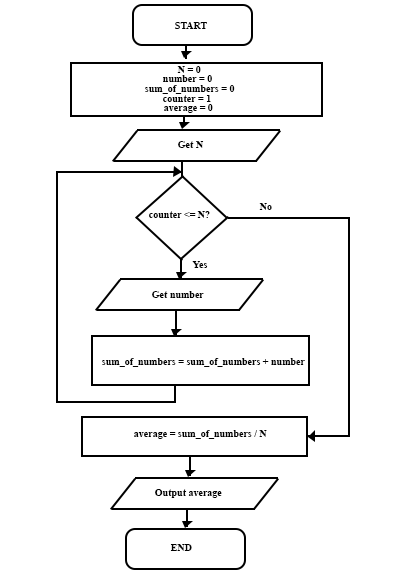
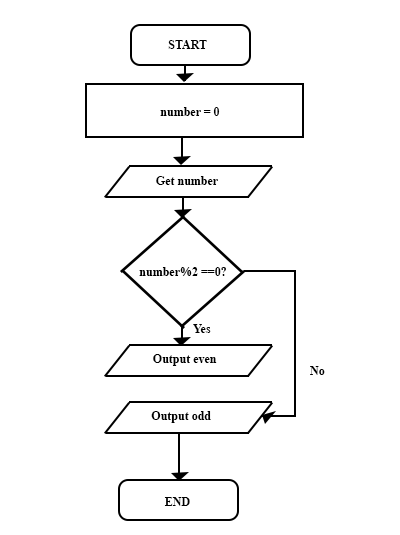
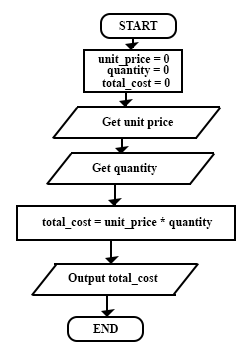
Pseudocode is a high-level, informal language that is used to describe the steps of an algorithm in a way that is easy to understand and can be translated into actual code.
Pseudocode is not bound by the syntax rules of any specific programming language, which allows developers to focus on the logic and structure of the algorithm without worrying about language-specific details.
When writing pseudocode, it's important to use clear and concise language, and to structure the pseudocode in a way that reflects the flow of the algorithm, using indentation and keywords to indicate control structures such as loops and conditionals.
Pseudocode can be a valuable tool for planning and designing algorithms, as it allows developers to think through the logic of the algorithm and identify any potential issues before writing actual code.
When writing pseudocode, you can follow these guidelines:
| Statement | Meaning | Example |
| INPUT / READ | Get data from the user or a file | INPUT UserAge |
| OUTPUT / PRINT | Display a result or message on the screen | PRINT "Access Granted" |
| SET / = | Store a value in a variable (Assignment) | SET Total TO 0 |
| Statement | Meaning | Example |
| IF ... THEN ... ELSE ... ENDIF | Checks if a condition is true. If it is, it does one thing; if not, it does something else. |
Two OptionsMore Than Two Options |
| Statement | Meaning | Example |
| WHILE ... ENDWHILE | Repeats steps as long as a condition remains true. (Pre-test loop) |
|
| FOR ... NEXT | Repeats steps a specific number of times. |
|
| REPEAT ... UNTIL | Repeats steps until a condition becomes true. (Post-test loop). |
FormatExamplePrompts users at least once and continues to be prompted until they enter the correct password. Calculating the square of numbers until the user enters 0 to stop the process. |
| Statement | Meaning | Example |
| + | Addition | SET Sum TO a + b |
| - | Subtraction | SET Difference TO a - b |
| * | Multiplication |
SET Price TO Quantity * UnitCost |
| / | Division | SET Pressure TO Force/Area |
The pseudocodes for the above algorithm are as follows:
START
    Initialize sum_of_numbers to 0
    Initialize counter to 1
    Initialize average to 0
    Read N (the number of numbers)
    WHILE counter <= N DO
        Read number
        sum_of_numbers = sum_of_numbers + number
        counter = counter + 1
    END WHILE
    average = sum_of_numbers / N
    Output average
ENDNote: the while is an iteration (repetition) structure and we will explain further under Loops.
START
    Initialize number to 0
    Read number
    IF number % 2 == 0 THEN
        Output "The number is even"
    ELSE
        Output "The number is odd"
    END IF
ENDNote: the if-else is a selection structure and we will explain further under Conditional statements.
START
    Initialize cost_per_unit to 0
    Initialize quantity to 0
    Initialize total_cost to 0
    Read cost_per_unit
    Read quantity
    total_cost = cost_per_unit * quantity
    Output total_cost
END
Once the algorithm is designed, the next step is to implement it by writing code in a programming language.
Implementation involves translating the algorithm into a specific programming language, such as C, Python, Java, etc., and ensuring that the code correctly follows the logic of the algorithm.
When implementing the algorithm, it's important to consider the following:
Implementing the algorithm involves writing code that accurately reflects the steps outlined in the algorithm, while also adhering to best practices for coding style and structure.
You must convert each algorithm into one or more code statements in your chosen programming language.
We will implement some of the above algorithms later on in this course after learning the basics of programming.
After implementing the algorithm, it's crucial to test and verify that the completed program works correctly and meets the specified requirements.
Testing involves running the program with various inputs to ensure that it produces the expected outputs and behaves as intended under different conditions.
Verification involves checking that the program meets the requirements and specifications defined in the first step of the software development method.
When testing and verifying the program, it's important to consider the following:
Testing and verifying the program is essential to ensure that it functions correctly and meets the needs of the users and stakeholders.
Don't rely on just one test case. Create multiple test cases using different sets of data to thoroughly evaluate the program's behavior.
After the program is deployed, it's important to maintain and update it as needed to address any issues, improve performance, or add new features.
Maintenance involves fixing bugs, optimizing code, and ensuring that the program continues to function correctly as the environment or requirements change.
Updating the program may involve adding new features, enhancing existing functionality, or adapting the program to new technologies or platforms.
When maintaining and updating the program, it's important to consider the following:
Maintaining and updating the program is an ongoing process that ensures the software remains relevant, functional, and valuable to its users over time.