
C is a high-level programming language developed in 1972 by Dennis Ritchie at AT&T Bell Laboratories.
C is a general-purpose programming language that is widely used for system programming, embedded systems, and application development. It is known for its efficiency, portability, and low-level access to memory.
C is a procedural programming language, which means that it focuses on writing procedures or routines that operate on data. It supports structured programming, which allows developers to break down complex problems into smaller, more manageable pieces.
C has a simple syntax and is easy to learn, making it a popular choice for beginners. It is also widely used in academia and industry, and many programming languages have been influenced by C, including C++, Java, and Python.
In order to be a good programmer, you must have some overview of computers and how they work.
The elements of a computer system fall into two major categories: hardware and software.
The hardware refers to the physical components of a computer, such as the central processing unit (CPU), memory, and input/output devices (monitor, keyboard, mouse, printer,speakers).
The software refers to the programs and instructions that tell the hardware what to do.
Software consists of the program that enable us to solve problems with a computer by providing it with lists of instructions to perform.
Programming was initially very difficult as programmers were to write their program instructions as long binary numbers.
However, the development of high-level programming languages like C has made programming much easier and more accessible.
In order to write a program, you need to have a good understanding of both hardware and software. You need to know how the hardware works and how to write software that can interact with it.
The computer hardware consists of the following components:
Memory is a critical component of a computer system that allows it to store and retrieve data. There are two main types of memory: main memory and secondary memory.
Main memory, also known as RAM (Random Access Memory), is the primary memory used by the computer to store data and instructions that are currently being used. It is volatile, which means that it loses its contents when the power is turned off.
The memory is organized into cells, and each cell has a unique address.
The memory address is a unique identifier for each location in memory.
Most computers have millions of individual memory locations, each with a unique address.
The memory cell can contain both data and a program instructions.
A program's instructions must be stored in main memory before they can be executed.
A memory cell is a grouping of smaller units called bytes.
A byte is the smallest unit of data that can be stored in memory.
A byte is the amount of storage required to store a single character such as A in the memory cell.
A byte also contain smaller units called bits.
The term bit is short for binary digit.
Binary refers to a number system that uses only two digits: 0 and 1. A bit is therefore either 0 or 1.
There are 8 bits in a byte.
Each value in memory is represented by a particular pattern of 0s and 1s.
A computer can either store or retrieve value.
To store a value, the computer places the appropriate pattern of 0s and 1s into each bit of a selected memory cell.
To retrieve a value, the computer reads the pattern of 0s and 1s from the memory cell to another storage area for processing.
Most computers have two types of main memory: RAM (Random Access Memory) and ROM (Read-Only Memory).
RAM (Random Access Memory) is a type of main memory that allows data to be read and written in any order. It is volatile, meaning it loses its contents when the power is turned off.
RAM temporary stores programs while they are being executed by the computer. It also temporary stores data such as numbers, names and pictures while a program is manipulating them.
ROM (Read-Only Memory) is a type of main memory that stores data permanently. It is non-volatile, meaning it retains its contents even when the power is turned off.
The computer can retrieve/read data from the ROM but cannot store/write information in it, hence it's name, read-only and is used for storing essential system start-up instructions and critical information that need to be preserved. It is non volatile, meaning it retains its contents even when the power is turned off.
When programmers refer to main memory, they are usually referring to RAM because it is the part of main memory that is normally accessible to them.
Secondary memory, on the other hand, is used for long-term storage of data and programs. It includes storage devices such as hard drives, solid-state drives, CDs, DVDs, and flash drives. Secondary memory is non-volatile, which means that it retains its contents even when the power is turned off.
The Central Processing Unit (CPU) is the brain of the computer. It is responsible for executing instructions and performing calculations. The CPU consists of two main components: the control unit and the arithmetic logic unit (ALU).
The control unit is responsible for fetching instructions from memory, decoding them, and executing them. It also manages the flow of data between the CPU and other components of the computer.
The arithmetic logic unit (ALU) is responsible for performing arithmetic and logical operations. It can perform operations such as addition, subtraction, multiplication, division, and logical comparisons.
The CPU operates at a very high speed, measured in gigahertz (GHz), which allows it to execute millions of instructions per second.
In order to write efficient programs, it is important to have a good understanding of how the CPU works and how to optimize code for performance.
To process a program stored in main memory, the CPU fetches each instruction from memory, decodes/interprets it, and executes it. It also retrieves data from memory as needed to carry out the instructions.
The CPU can compare the contents of two memory locations and determine if they are equal, or if one is greater than the other and make decisions based on the results of that comparison.
A processor's current instruction and data values are stored temporarily inside the CPU in special high-speed memory locations called registers
Registers are used to hold data that is being processed by the CPU, as well as intermediate results of calculations. They are much faster than main memory, which allows the CPU to access data quickly and efficiently.
Most CPUs have a small number of registers, typically between 8 and 32, which are used for various purposes such as holding the current instruction, storing data values, and keeping track of the program's execution state.
Some multiprocessor companies use multiple CPUs to perform tasks in parallel, which can significantly improve performance for certain types of applications.
Input/output (I/O) devices communicate with the computer to allow users to input data and receive output.
When you press a letter or digit on a keyboard (input device), that character is sent to the main memory and is also displayed on the screen at the position of the cursor, a moving place marker (often a blinking line or rectangle).
Computer software refers to the programs and instructions that tell the hardware what to do. It can be categorized into two main types: system software and application software.
System software includes the operating system, device drivers, and utility programs.
The operating system is the most important type of system software, as it manages the computer's resources and provides a platform for running application software.
Application software includes programs that perform specific tasks for users, such as word processors, web browsers, and games.
Computer languages are used to communicate with computers and instruct them on how to perform specific tasks.
Developing new software requires writing lists of instructions for a computer to execute.
The processor understands only machine language which is the lowest-level programming language that can be directly executed by the CPU and is a collection of binary numbers.
There is different machine languages for different types of CPU processors.
To write programs that are independent of the processor on which they will be executed, software designers use high-level programming languages that combine algebraic concepts with more human-readable syntax.
All though programmers find it far easier to write code in high-level languages than in machine language, computers do not understand high-level languages directly.
To execute a program written in a high-level language, it must first be translated into machine language using a compiler or an interpreter.
A compiler is a program that translates high-level code into machine language before the program is executed. The resulting machine code can be stored and executed later without the need for the compiler.
An interpreter is a program that translates high-level code into machine language line by line as the program is executed. This allows for more flexibility and easier debugging, but can be slower than using a compiler.
Some programming languages, such as Java, use a combination of both compilation and interpretation. Java code is first compiled into an intermediate form called bytecode, which is then interpreted by the Java Virtual Machine (JVM) at runtime.
The programmer writes the code in an editor and saves it with an extension like .c
The input to a compiler is the source code/file written in a high-level programming language.
The compiler scans the source code and checks for syntax errors to ensure it follows the rules of the programming language.
The output of a compiler if the program is syntactically correct, is the object code/file which is the machine language version of the source code that carry out the program's purpose.
Most high-level language compilers are sold as part of an integrated development environment (IDE), a package that combines a simple word processor with a compiler, linker and loader.
The IDE provides a user-friendly interface for writing, editing, and debugging code.
Some popular IDEs for C programming include Code::Blocks, Eclipse, and Visual Studio.
Before you can begin writing a program, you need to have a clear understanding of the problem you are trying to solve. This involves gathering requirements from stakeholders, defining the scope of the project, and identifying any constraints or limitations that may affect the solution.
Your objective is to eliminate unimportant details and focus on the core requirements.
Analyzing the problem involves identifying the problem (a) inputs, that is, the data you have to work with, (b) outputs, that is, the results you want to achieve and (c) any additional requirements or constraints on the solution.
To illustrate these two methodes, consider you have been asked to design a software that takes a number as input and indicates whether it is even or odd.
In this case, the input is a number, and the output is a message indicating whether the number is even or odd.
Additional requirements may include handling negative numbers, zero, and non-integer inputs.
Designing the algorithm involves creating a step-by-step procedure to solve the problem. These lists of steps is called algorithm.
Algorithm for a programming problem involves these steps:
The algorithm for determining if a number is even or odd can be designed as follows:
Once you have designed the algorithm, you can then implement it in a programming language like C.
Implementing the algorithm involves writing the actual code in a programming language to perform the steps outlined in the algorithm. This is where you translate your algorithm into a form that can be executed by a computer.
When implementing the algorithm, it is important to follow best practices for coding, such as using meaningful variable names, writing clear and concise code, and adding comments to explain the logic of the code.
These we will discuss in more detail in future lessons.
Testing and verifying the completed program involves running the program with various inputs to ensure that it produces the correct outputs and behaves as expected. This is an important step in the software development process, as it helps to identify and fix any bugs or errors in the code.
When testing a program, it is important to use a variety of test cases, including edge cases and invalid inputs, to ensure that the program can handle all possible scenarios.
Once you have identified any issues or bugs in the program, you can then fix them and retest the program until it is working correctly.
Maintaining and updating the program involves making changes to the code as needed to fix bugs, add new features, improve performance or to keep it up-to-date as government regulations or company policies change. This is an ongoing process that may continue for the life of the program.
It is therefore important to create programs that are easy to read, understand and maintain.
We will be using Code::Blocks as our IDE.
Install Code::Blocks which already has the compiler embedded.
Click on the link below to download and install Code::Blocks:
Download the binary distribution of Code::Blocks
Note: choose codeblocks-25.03mingw-setup.exe as the installer already has the compiler embedded.
You need to check the version of your operating system (64-bit or 32-bit) to know which installer to download.
Double-click on the downloaded installer and follow the installation wizard to complete the installation.
Once you have installed Code::Blocks, you can create your first C program by following these steps:
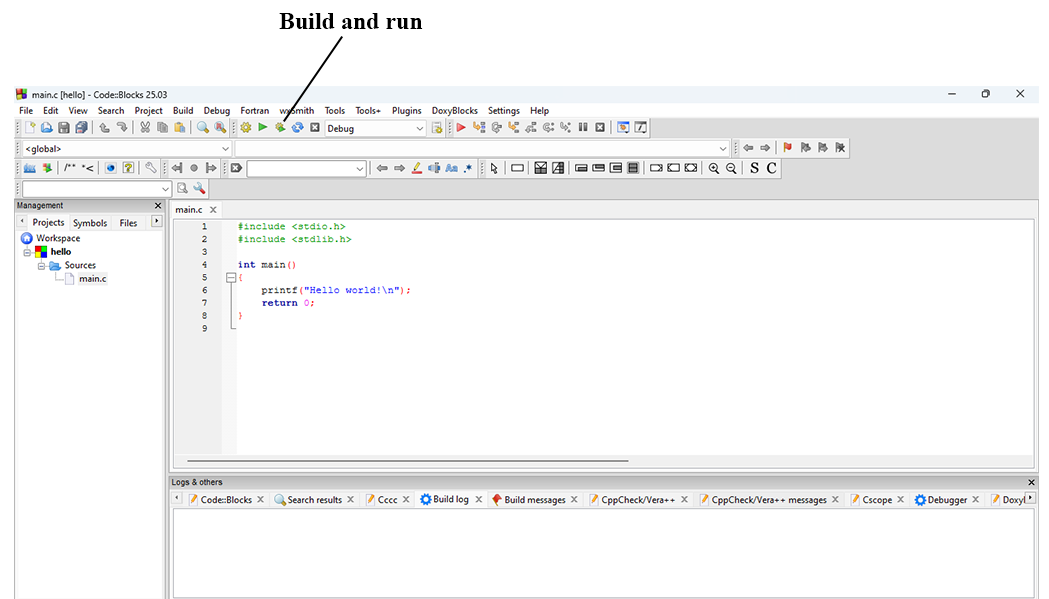
You will get something like this when you run your code
