
A constructor is a special method that is automatically called when an object of a class is created.
To create a constructor, the same name as the class is used, followed by parentheses ():
If the constructor intializes certain class variables, arguments to initialize them are placed in the parentheses ().
#include <iostream>
using namespace std;
class Ball{
    public:
    //Class constructor
    Ball(){
        cout << "Ball object created" << endl;
    }
};
int main() {
    Ball ball;

    return 0;
}
Note: you must use the public access specifier for the constructor to be accessing by objects created.
A computer ping pong game is famously known as Pong, one of the first arcade video games ever made.
It features a simple two-dimensional layout where players move small paddles up and down to hit a bouncing ball back and forth across a virtual net.
In order to create such a game, a class for the ball and paddle have to be created.
When the ball object is created, it's X and Y cordinates are initialized to position the ball on the screen
When a paddle object is also created, it's X and Y cordinates are initialized to position the paddle on the screen
There are two small paddles and one ball in this game.
The paddles are moved with the up and down arrows.
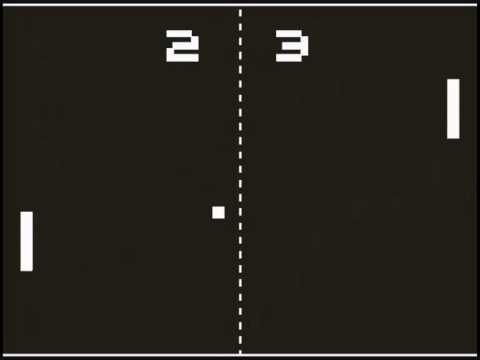
We will modify the Ball class to initialize the X and Y cordinates in the constructor when an object of the class is created.
#include <iostream>
using namespace std;
class Ball{
    public:
    int xPos;
    int yPos;
    //Class constructor
    Ball(int x, int y){
        cout << "Ball object created" << endl;
        xPos = x;
        yPos = y;
    }
};
int main() {
    Ball ball(10,20);
    //Show the x and y coordinates of the ball
    cout << "Ball is at (" << ball.xPos << "," << ball.yPos << ")" << endl;

    return 0;
}
We can modify the above code to create the padding class
#include <iostream>
using namespace std;
class Paddle{
    public:
    int xPos;
    int yPos;
    //Class constructor
    Paddle(int x, int y){
        cout << "Paddle object created" << endl;
        xPos = x;
        yPos = y;
    }
};
int main() {
    Paddle paddle(5,50);
    //Show the x and y coordinates of the paddle
    cout << "Paddle is at (" << paddle.xPos << "," << paddle.yPos << ")" << endl;

    return 0;
}
The movement of the ball is done by an algorithm of the programmer. Random numbers could be generated to increase the ball X and Y coordinates.
A collision detection function is also written to check if a ball hits a paddle to bounce it by reducing the x cordinate.
The paddle position is updated by the movement of the up and down arrows.
The programmer decides the Y interval per arrow keystroke. When the up arrow is pressed, the Y position is increased by that interval and when the down arrow is pressed, the Y position is reduced by that interval.
Additional methods could be added to the ball and paddle classes to update the X and Y positions.
#include <iostream>
using namespace std;
class Ball{
    public:
    int xPos;
    int yPos;
    //Class constructor
    Ball(int x, int y){
        cout << "Ball object created" << endl;
        xPos = x;
        yPos = y;
    }
    void setBallPosition(int x, int y){
        xPos = x;
        yPos = y;
    }
};
int main() {
    Ball ball(10,20);
    //Show the x and y coordinates of the ball
    cout << "Ball is at (" << ball.xPos << "," << ball.yPos << ")" << endl;
    ball.setBallPosition(2, 50);
    cout << "Ball is now at (" << ball.xPos << "," << ball.yPos << ")" << endl;

    return 0;
}
#include <iostream>
using namespace std;
class Paddle{
    public:
    int xPos;
    int yPos;
    int interval = 5;
    //Class constructor
    Paddle(int x, int y){
        cout << "Paddle object created" << endl;
        xPos = x;
        yPos = y;
    }
    void moveUp(){
        yPos = yPos + interval;
    }
    void moveDown(){
        yPos = yPos - interval;
    }
};
int main() {
    Paddle paddle(5,50);
    //Show the x and y coordinates of the paddle
    cout << "Paddle is at (" << paddle.xPos << "," << paddle.yPos << ")" << endl;
    //The up arrow key pressed 5 times
    paddle.moveUp();
    paddle.moveUp();
    paddle.moveUp();
    paddle.moveUp();
    paddle.moveUp();
    cout << "Paddle is now at (" << paddle.xPos << "," << paddle.yPos << ")" << endl;
    //The down arrow pressed 2 times
    paddle.moveDown();
    paddle.moveDown();
    cout << "Paddle is now at (" << paddle.xPos << "," << paddle.yPos << ")" << endl;
    return 0;
}
In advanced C++ programming, a key listener is added in the code to listen to keystroke. Once the up arrow key is pressed, the moveUp() method is called and once the down arrow key is pressed, the moveDown() method is called.
An algorithm as explained earlier is also written for the ball to move based on the level of the game and the speed of the ball movement (ball position interval).
A collission detection is also written to check if the ball hits a paddle, to bounce back
If a ball by passes a paddle, it is recorded as a score.
We will write this game in our advanced C++ programming course.
You can also declare the constructor in the class and implement it outside the class.
The sample code below illustrates that
#include <iostream>
using namespace std;
#include
using namespace std;
class Car {        // The class
  public:          // Access specifier
    string brand;  // Attribute
    string model;  // Attribute
    int year;      // Attribute
    Car(string x, string y, int z); // Constructor declaration
};

// Constructor implementation outside the class
Car::Car(string x, string y, int z) {
  brand = x;
  model = y;
  year = z;
}

int main() {
  // Create Car objects and call the constructor with different values
  Car car_1("BMW", "X7", 2019);
  Car car_2("Ford", "Mustang", 1969);

  // Print values
  cout << car_1.brand << " " << car_1.model << " " << car_1.year << "\n";
  cout << car_2.brand << " " << car_2.model << " " << car_2.year << "\n";
  return 0;
}
You can have more than one constructor in the same class. This is called constructor overloading.
Each constructor must have a different number or type of parameters, so the compiler knows which one to use when you create an object.
We will modify our paddle class to have 3 constructors each having the following parameters
#include <iostream>
using namespace std;
class Paddle{
    public:
    int xPos;
    int yPos;
    int interval = 5;
    string player;
    //Class constructor
    Paddle(){
        cout << "Paddle object created" << endl;
    }
    Paddle(int x, int y){
        xPos = x;
        yPos = y;
    }
    Paddle(string p,int x, int y){
        player = p;
        xPos = x;
        yPos = y;
    }
    void moveUp(){
        yPos = yPos + interval;
    }
    void moveDown(){
        yPos = yPos - interval;
    }
};
int main() {
    //Creating object with the constructor with no parameter
    Paddle p;
    //Creating object with the constructor with two parameters
    Paddle paddle(5,50);
    //Show the x and y coordinates of the paddle
    cout << "Paddle is at (" << paddle.xPos << "," << paddle.yPos << ")" << endl;
    //The up arrow key pressed 5 times
    paddle.moveUp();
    paddle.moveUp();
    paddle.moveUp();
    paddle.moveUp();
    paddle.moveUp();
    cout << "Paddle is now at (" << paddle.xPos << "," << paddle.yPos << ")" << endl;
    //The down arrow pressed 2 times
    paddle.moveDown();
    paddle.moveDown();
    cout << "Paddle is now at (" << paddle.xPos << "," << paddle.yPos << ")" << endl;
    //Creating object with constructor with 3 parameters
    Paddle p_2("Godwin Ashong",20,100);
    cout << "Player is " << p_2.player << ". Paddle is at (" << p_2.xPos << "," << p_2.yPos << ")" << endl;
    return 0;
}