
An array is a versatile data structure that acts as an ordered map, allowing you to store multiple values-even of different data types-in a single variable.
It is used to store a collection of data, but it is often more useful to think of an array as a collection of variables. Instead of declaring individual variables, such as number0, number1, ..., number99, you can declare one array variable such as numbers and use numbers[0], numbers[1], ..., numbers[99] to access the individual variables.
Arrays are used to store multiple values in a single variable, instead of declaring separate variables for each value. An array can hold many values under a single name, and you can access the values by referring to the index number.
Index number is the position of the element in the array.
It starts from 0 to the last being (size of array - 1)
For instance if the size of an array is 10, the indexes will be as follows
| Element Number | Index Number |
| 1 | 0 |
| 2 | 1 |
| 3 | 2 |
| 4 | 3 |
| 5 | 4 |
| 6 | 5 |
| 7 | 6 |
| 8 | 7 |
| 9 | 8 |
| 10 | 9 |
As you can see, the last index number is one less than the size of the array because the index number starts from 0.
You can picture an array as a bookshelf where books are stored.
The books represents the data/elements to be stored and must have the same data type as it is inappropriate to place other items which are not books in a bookshelf.
For easy location of the books, the shelf is numbered so you know which book is at what shelf number.
The shelf number (slot) represents the index number. In this case the shelf numbering starts from 0

Array in PHP programming can be declared in any of the following ways:
$arrayName = [];$arrayName = [values];$fruits = [];$fruits = ["Apples","Mangos","Pineapples"];Just like the bookshelf analogy, when you want a particular book, you have to go to the shelf where it is located and pick the book from that slot, you also access array elements using their index.
You can access the elements of an array using the index number:
$numbers = [1,2,5,7,10,12,15];
index is the position of the element in the array.
For example, to access the elements (n) of an array , you can use the following code:
$numbers[0];
$numbers[1];
$numbers[2];
$numbers[3];
$numbers[4]; and so on until $numbers[n-1];
Note: You will get a compilation error if you try to access an element outside the bounds of the array (index is negative or greater than or equal to the array size).
You can as well use a loop to access all elements of an array if you know the size of the array.
The initial control variable for the loop is usually set to 0, and the loop continues until it reaches the size of the array.
For example, if the size of the array is n and the control variable is i, you can access all elements:
for ($i = 0; $i < n; $i++) {
    $variable = $numbers[$i];
}
You can also use a loop to print all elements of an array:
for ($i = 0; $i < n; $i++) {
    echo "<p>".$numbers[$i]."</p>";
}The size of an array is the number of elements it can hold. You can find the size of an array using the count($array); function:
You can change the value of an array element by assigning a new value to it:
$numbers[index] = new_value;Where index is the position of the element in the array and new_value is the value to be assigned.
For example, to change the value of the element at index 2 to 15, you can use the following code:
$numbers[2] = 15;
Likewise to change the first element, you can use the following code:
$numbers[0] = 10;
And to change the last element, you can use the following code:
$numbers[n-1] = 20;
Where n is the size of the array.
An associative array is an array that uses named keys (strings or custom integers) instead of sequential numbers (0, 1, 2...) to access values.
Associative arrays pair keys and values using the fat arrow (=>) operator.
$user = [
    "name" => "Godwin Ashong",
    "email" => "test@gmail.com",
    "role" => "Admin"
];A multi-dimensional array contains one or more arrays inside itself, making it ideal for tabular or complex database records.
$matrix = [
    ["Row1-Col1", "Row1-Col2"],
    ["Row2-Col1", "Row2-Col2"]
];
You can access a value in a multi-dimensional array using the row and column number.
echo $array[rowIndex][ColumnIndex];echo $matrix[1][0];The above code displays the second row and column 1.
You can create multi-dimensional array using the function array_push which adds arrays to an array variable.
array_push($arrayContainer,$array);$users = [];
$user = [
"name" => "Godwin Ashong",
"email" => "test@gmail.com",
"role" => "Admin"
];
array_push($users,$user);
$user = [
"name" => "Yaw Gyasi",
"email" => "test2@gmail.com",
"role" => "Teacher"
];
array_push($users,$user);
In the above example, the first row, will have the information of the user by name Godwin Ashong and the second, Yaw Gyasi.
You can use the row index to access the entire array or you can use the row index and the key to access specify key value.
<?php
$users = [];
$user = [
    "name" => "Godwin Ashong",
    "email" => "test@gmail.com",
    "role" => "Admin"
];
array_push($users,$user);
$user = [
    "name" => "Yaw Gyasi",
    "email" => "test2@gmail.com",
    "role" => "Teacher"
];
array_push($users,$user);
$row_1 = $users[0];
echo $row_1['name'];
?>The above code, will display, Godwin Ashong
We can also access the first row name with just a single code.
<?php
$users = [];
$user = [
    "name" => "Godwin Ashong",
    "email" => "test@gmail.com",
    "role" => "Admin"
];
array_push($users,$user);
$user = [
    "name" => "Yaw Gyasi",
    "email" => "test2@gmail.com",
    "role" => "Teacher"
];
array_push($users,$user);
echo $users[0]['name'];
?>The foreach loop is the most common and efficient way to loop through arrays in PHP.
It automatically loops through every single item from the beginning to the end of the array without you needing to manage numerical counters or boundary limits.
Depending on whether your array is indexed or associative, you can use one of two syntaxes.
<?php
$fruits = ["Apple", "Banana", "Mango", "Orange"];

foreach ($fruits as $fruit) {
    echo $fruit . "\n";
}

?>
In each cycle of the loop, the value of the current element is assigned to the temporary variable $fruit, and the array internal pointer moves forward by one.
If you are working with an associative array and need access to both the label (key) and the data (value), use this extended syntax.
<?php
$user = [
    "Name"  => "Godwin Ashong",
    "Email" => "test@gmail.com",
    "Role"  => "Developer"
];

foreach ($user as $key => $value) {
    echo $key . ": " . $value . "\n";
}

?>In each cycle of the loop, the current array is assigned to the temporary variable $variable which can be accessed.
<?php

$employees = [
    ["name" => "Godwin Ashong", "role" => "Developer", "status" => "Active"],
    ["name" => "Alex Mensah",   "role" => "Designer",  "status" => "Pending"]
];

// $employee represents the entire inner array block for each person
foreach ($employees as $employee) {

    // Access individual fields directly using bracket keys
    echo "Employee: " . $employee['name'] . "\n";
    echo "Role: " . $employee['role'] . "\n";
    echo "Status: " . $employee['status'] . "\n";
    echo "---------------------------\n";
}

?>Create an array of products. Each row of product must have the following:
Place the images in a folder in your main folder.
Loop through the products to display the products in a table as shown below.
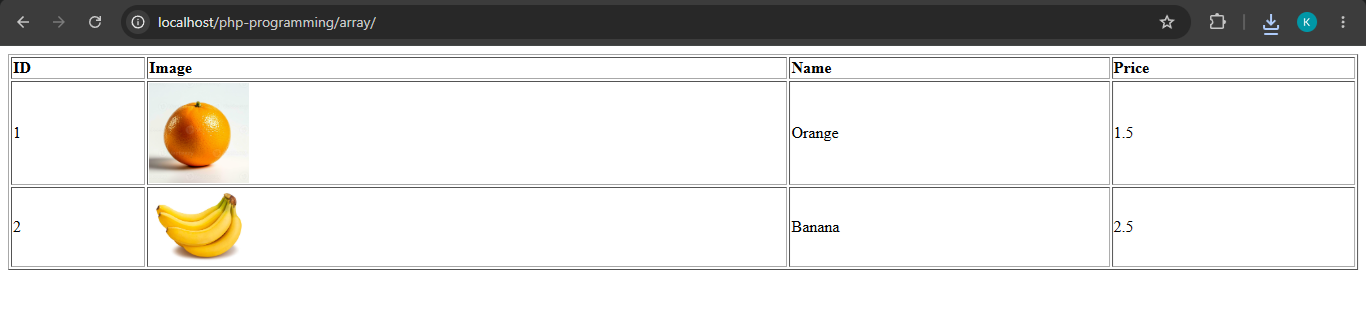
<?php
$products = [];
$product = [
    "image" => "http://localhost/php-programming/array/images/orange.jpg",
    "name" => "Orange",
    "price" => 1.5,
    "id" => 1
];
array_push($products,$product);
$product = [
    "image" => "http://localhost/php-programming/array/images/banana.jpg",
    "name" => "Banana",
    "price" => 2.5,
    "id" => 2
];
array_push($products,$product);
?>
<table width="100%" border="1">
    <tr>
        <td style="font-weight:bold;">ID</td>
        <td style="font-weight:bold;">Image</td>
        <td style="font-weight:bold;">Name</td>
        <td style="font-weight:bold;">Price</td>
    </tr>
    <?php
    foreach($products as $p){
    ?>
        <tr>
            <td></td>
            <td><img src="<?php echo $p['image'];?>" width="100" /></td>
            <td></td>
            <td></td>
        </tr>
    <?php
    }
    ?>
</table>

?>